












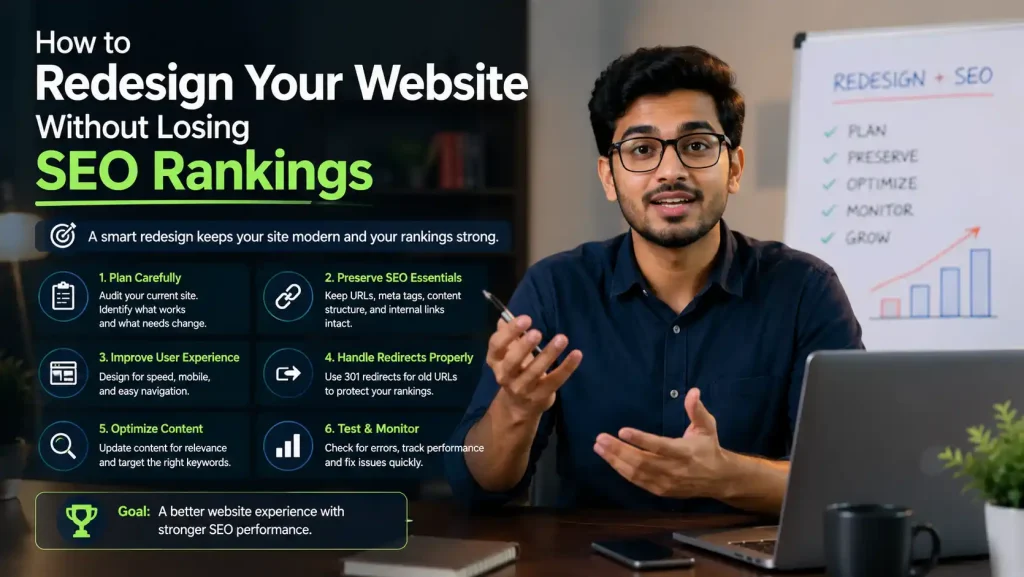
How to Redesign Your Website Without Losing SEO Rankings: Complete Guide
Introduction
how to redesign website without losing SEO rankings You wake up to a nightmare email from your marketing team: “Our organic traffic dropped 60% after the website redesign.”
This scenario happens to thousands of businesses every year. A website redesign that was supposed to improve user experience and conversions becomes an SEO disaster, costing companies ₹10-50 lakh in lost revenue.
The tragic part? Most of this loss is completely preventable.
The difference between a redesign that maintains rankings and one that destroys them often comes down to planning and execution of 5-10 critical steps.
This comprehensive guide will walk you through exactly how to redesign your website while preserving—or even improving—your SEO rankings. Whether you’re changing the design, migrating platforms, or restructuring your site architecture, this guide covers everything you need to know.
Why Website Redesign Is Important (But Risky)
Why Redesign Is Necessary:
Business Reasons:
- Outdated design hurts credibility
- Poor user experience = low conversions
- Mobile optimization needed
- Performance issues (slow loading)
- Platform limitations
- Competitive disadvantage
- Rebranding requirements
- Technology upgrades
Marketing Reasons:
- Better conversion rates
- Improved user engagement
- Higher search rankings (with proper execution)
- Better mobile experience
- Faster page load times
- Improved accessibility
Why Redesign Risks SEO:
Common Redesign Mistakes:
- Changing URLs without redirects (broken links = lost authority)
- Moving content structure (loses context)
- Removing old content (loses rankings)
- Changing page metadata (loses optimization)
- Ignoring speed optimization (ranking factor)
- No testing before launch (discover issues too late)
- Poor redirect strategy (search bots confused)
Impact of Mistakes:
- 30-70% traffic loss (common)
- 50-90% conversion loss
- 6-12 months recovery time
- Lost keyword rankings
- Damaged backlink value
- Lost domain authority
The Complete Website Redesign Process (With SEO Protection)
Phase 0: Pre-Redesign Audit & Planning (2-3 weeks)
This is the most critical phase. Everything depends on this.
Step 1: Complete Website Audit
What to Document:
1. Traffic & Rankings:
- Current monthly organic traffic (screenshot)
- Top 100 keywords and their rankings
- Traffic by page (Google Analytics 4)
- Conversion rates by page
- Bounce rate by page
- Average session duration by page
Tools:
- Google Analytics 4
- Google Search Console
- Semrush / Ahrefs
- Rank Tracker
Action: Create spreadsheet with:
URL | Traffic | Rankings | Conversions | Backlinks | Bounce Rate
This becomes your “before” snapshot to compare post-redesign.
2. Backlink Profile:
- How many backlinks each page has
- Domain authority of linking sites
- Anchor text used in links
- Which pages are linked most
Tools:
- Ahrefs or Moz
- Google Search Console (linking sites)
Why Important: You need to preserve the value of these backlinks. If URLs change, backlinks break.
3. Content Inventory:
- All pages on current site
- Page titles and meta descriptions
- Heading structure (H1, H2, H3)
- Word count
- Internal link structure
- Images and alt text
Action: Export complete content audit to spreadsheet.
4. Technical SEO Audit:
- Current URL structure pattern
- Page speed metrics (Core Web Vitals)
- Mobile responsiveness
- Crawlability (robots.txt, sitemap)
- SSL certificate status
- Structured data (schema markup)
- Duplicate content issues
Tools:
- Google PageSpeed Insights
- Screaming Frog
- Google Search Console
Step 2: Plan New URL Structure
Critical Decision: Will you keep the same URL structure or change it?
Option A: Keep Current URL Structure
Advantages:
- No 301 redirects needed
- Backlinks remain valid
- Faster SEO recovery
- Less risky
Best For:
- Simple redesigns
- Design updates only
- No structural changes
- Minimal content changes
Implementation:
- Keep current URLs exactly the same
- Same page names
- Same directory structure
- Just update design/content
Option B: New URL Structure
Advantages:
- Clean, optimized structure
- Fix poor URL naming
- Better SEO-friendly URLs
- Modern structure
Disadvantages:
- Requires 301 redirects (all pages)
- More complex implementation
- Higher risk if done wrong
- More recovery time needed
Best For:
- Complete platform migration
- Major structural changes
- Fixing poor URL structure
- Opportunity to optimize
URL Best Practices:
If you’re creating new URLs:
✅ GOOD: /blog/how-to-redesign-website-seo
✅ GOOD: /services/custom-website-development
✅ GOOD: /products/website-builder-software
❌ BAD: /page1, /page2, /page3
❌ BAD: /content/12345
❌ BAD: /blog/post-1-2-3-4
Step 3: Create Redirect Mapping Document
If You're Changing URLs:
Create detailed mapping of OLD → NEW URLs:
OLD URL | NEW URL | Redirect Type | Status
/about-us | /about | 301 | ✓
/services/web-design | /services/website-design | 301 | ✓
/blog/old-post | /blog/updated-post | 301 | ✓
Why Important:
- Ensures no redirects are missed
- Preserves backlink authority
- Guides technical implementation
- Verification after launch
Tools:
- Simple spreadsheet
- Redirect Map Generator (online tools)
- Screaming Frog (to extract URLs)
Step 4: Content Decision Matrix
For Each Page, Decide:
| Decision | Action |
|---|---|
| Keep As-Is | No changes to content/metadata |
| Update Content | Refresh, improve, expand |
| Merge Pages | Combine 2-3 weak pages into 1 strong page |
| Delete Page | Page has no value, 404 or redirect to similar |
| New Page | Create new content for gaps identified |
| 301 Redirect | Redirect to most relevant current page |
Phase 1: Design & Development (4-8 weeks)
Step 5: Build on Staging Server
NEVER redesign on production site.
Proper Process:
- Clone entire site to staging server
- Redesign and develop on staging
- Thoroughly test everything
- Only then move to production
Staging Environment Setup:
- Same server as production
- Exact duplicate of current site
- Isolated from public view
- Block search engines with robots.txt
Step 6: Preserve SEO Elements
During Development, Ensure:
✅ Keep All Page Titles:
- Extract from old site
- Paste into new site
- Don’t change without reason
✅ Keep All Meta Descriptions:
- Copy from old site
- Use in new site
- Don’t delete or shorten
✅ Keep Internal Link Structure:
- Map old links to new pages
- Update anchor text if needed
- Maintain contextual relevance
✅ Keep Heading Structure (H1→H2→H3):
- Same hierarchy
- Same focus keywords
- Same content organization
✅ Keep Content Intact:
- Copy all text content
- Preserve formatting
- Don’t delete important content
Red Flags:
- Rewriting titles “for new design”
- Removing metadata
- Deleting old content
- Changing URL structure without planning
- Losing internal links
Step 7: Implement Proper Redirects (If URL Changes)
301 Redirect Setup:
If you’re changing URLs, implement 301 redirects BEFORE going live.
htaccess Method (Apache):
RewriteEngine On
RewriteRule ^old-page$ /new-page [R=301,L]
RewriteRule ^blog/old-post$ /blog/updated-post [R=301,L]
WordPress Redirect Plugins:
- Redirection (free)
- Yoast SEO (built-in redirects)
- 301 Redirects
Benefits of 301 Redirects:
- Transfers 90-99% of backlink authority
- Preserves search rankings
- User-friendly (auto-redirects)
- Search engine approved
- Long-term solution
Step 8: Optimize for Core Web Vitals
During Redesign, Optimize:
1. Largest Contentful Paint (LCP):
- Target: < 2.5 seconds
- Optimize images
- Minimize CSS/JavaScript
- Use CDN
2. First Input Delay (FID):
- Target: < 100 milliseconds
- Reduce JavaScript
- Optimize CSS
- Efficient code
3. Cumulative Layout Shift (CLS):
- Target: < 0.1
- Fixed layout (no pop-ups)
- Reserved space for images
- Font stability
Tools:
- Google PageSpeed Insights
- WebPageTest
- Lighthouse (Chrome DevTools)
Why Important: Core Web Vitals are ranking factors. Redesign is perfect time to improve.
Phase 2: Testing & Pre-Launch (2-3 weeks)
Step 9: Comprehensive Testing Checklist
Link Testing:
All internal links work (no 404s)
All external links work
Redirect chains don’t exist (A→B→C is bad)
Anchor links work (#section)
Content Testing:
All text displays correctly
Images display properly
Videos embed correctly
Special characters display right
Mobile view looks good
Tablet view looks good
Desktop view looks good
Functionality Testing:
Contact forms work
Search function works
Navigation menus work
Filters/sorting work
Shopping cart (if applicable)
User accounts (if applicable)
SEO Testing:
Metadata (title, description) present
Schema markup validates (structured data)
Sitemap.xml exists
robots.txt correct
Canonical tags correct
Open Graph tags present
Internal links optimal
Performance Testing:
Page load times < 3 seconds
Core Web Vitals passing
Mobile speed good
Desktop speed good
Images compressed
No broken resources
Browser Testing:
Chrome (latest)
Firefox (latest)
Safari (latest)
Edge (latest)
Mobile browsers
Older browsers (optional)
Step 10: SEO Pre-Flight Checklist
Before launch, verify:
URLs & Redirects:
All old URLs have 301 redirects (if changed)
Redirect mapping is 100% complete
No redirect chains
Test 20-30 random redirects
Content:
All content migrated
No orphaned pages
Titles and descriptions intact
Headings proper hierarchy
Focus keywords preserved
Meta tags complete
Technical:
SSL certificate valid
robots.txt allows crawling
Sitemap.xml updated with new URLs
Canonical tags correct
No noindex tags (unless intentional)
Structured data validates
Core Web Vitals passing
Analytics:
Google Analytics properly configured
Event tracking configured
Goal tracking configured
Search Console ready
UTM parameters configured
Phase 3: Launch (1 day)
Step 11: Coordinated Launch
The Day Before:
- Final testing complete
- All systems verified
- Team briefed
- Rollback plan ready
Launch Day - Morning:
- Implement redirects
- Update DNS (if domain changing)
- Update XML sitemap
Launch Day - Noon:
- Deploy new site to production
- Test 50-100 URLs
- Verify redirects working
- Check analytics tracking
Launch Day - Afternoon:
- Notify search engines
- Submit sitemap to Google Search Console
- Submit sitemap to Bing Webmaster Tools
- Monitor for critical errors
Launch Day - Evening:
- Check for error spikes
- Monitor server health
- Check analytics
- Team on standby
Step 12: Immediate Post-Launch Actions
Within 1 Hour:
- Verify site is live and working
- Check redirects (sample 20 URLs)
- Verify analytics tracking working
- Monitor server performance
Within 24 Hours:
- Submit updated sitemap to Google Search Console
- Request crawl of homepage
- Check Search Console for errors
- Monitor organic traffic (check for spikes/drops)
- Monitor conversion rates
- Fix any critical bugs found
Within 1 Week:
- Detailed analytics review
- Check keyword ranking impact
- Review Core Web Vitals
- Review crawl stats in Search Console
- Fix any issues identified
- Gather team feedback
Phase 4: Monitoring & Recovery (6-12 weeks)
Step 13: Ongoing Monitoring
Weekly (First 4 weeks):
- Organic traffic
- Keyword rankings (top 50)
- Google Search Console errors
- Core Web Vitals
- User behavior metrics
- Conversion rates
Monthly (Months 2-3):
- Organic traffic trends
- Full keyword rankings (top 100+)
- Backlink health
- Content performance
- User experience metrics
- Competitor comparison
Key Metrics to Track:
Metric | Expected | Actual | Status
Organic Traffic | Maintain or +5% | ? | ?
Top Keywords | Maintain position | ? | ?
Core Web Vitals | All Green | ? | ?
Click-Through Rate | +2-5% | ? | ?
Conversion Rate | +5-10% | ? | ?
Bounce Rate | -5-10% | ? | ?
Step 14: Issue Resolution
If Traffic Drops:
Immediate (Day 1-3):
- Identify which pages/keywords dropped
- Check for indexing issues (Search Console)
- Verify redirects working correctly
- Check for crawl errors
- Verify no technical issues
Short-term (Week 1-2):
- Build backlinks to top pages
- Improve content quality
- Optimize for Core Web Vitals
- Increase internal linking
- Improve CTR (better titles/descriptions)
Long-term (Week 3-12):
- Create new content (fill gaps)
- Improve existing content
- Build authority (backlinks, mentions)
- Improve technical SEO
- Optimize user experience
Common Redesign Mistakes (And How to Avoid Them)
❌ Mistake 1: Not Implementing 301 Redirects
The Problem: Old URLs get 404 errors. Backlinks are lost. Rankings disappear.
The Fix: Implement 301 redirects for EVERY changed URL.
Impact: Difference between -5% traffic and -60% traffic loss.
❌ Mistake 2: Deleting Content
The Problem: “We’ll just delete these old pages.” Result: Rankings lost, traffic lost, backlinks broken.
The Fix: Never delete pages. Redirect to similar content or keep.
Why: Those pages rank for keywords. They have backlinks. They have value.
❌ Mistake 3: Changing Titles & Metadata
The Problem: Rewriting all titles “for the new design.” Result: Lose keyword optimization, rankings drop.
The Fix: Keep existing titles/descriptions unless there’s specific reason to change.
❌ Mistake 4: Poor URL Structure
The Problem: New URLs are /new-page-1, /new-page-2 (non-descriptive). Result: Weak SEO, difficult to optimize.
The Fix: Plan URL structure carefully. Use keywords. Keep it clean.
❌ Mistake 5: Ignoring Core Web Vitals
The Problem: “We’ll optimize speed after launch.” Result: Poor rankings, lost traffic.
The Fix: Optimize during redesign. Test before launch.
❌ Mistake 6: No Pre-Launch Testing
The Problem: Launch site, discover broken links and errors. Result: Poor user experience, SEO penalties.
The Fix: Comprehensive testing before launch. Fix all issues.
❌ Mistake 7: Losing Internal Link Structure
The Problem: Reorganizing site structure. Internal links break. Result: Poor crawlability, authority not flowing.
The Fix: Map internal links. Update or redirect.
❌ Mistake 8: Not Notifying Search Engines
The Problem: Launch redesigned site. Search engines don’t know about it. Result: Slow indexing, delayed recovery.
The Fix: Submit updated sitemap. Request recrawl in Search Console.
Do's and Don'ts for Website Redesign
✅ DO:
1. Do Complete Pre-Redesign Audit
- Document everything before starting
- Create baseline metrics
- Use this for comparison post-launch
2. Do Plan URL Structure Carefully
- Think about long-term
- Use SEO-friendly URLs
- Be consistent
3. Do Implement Proper 301 Redirects
- For every changed URL
- Test them
- Keep for at least 6 months
4. Do Test Thoroughly
- Multiple browsers
- Multiple devices
- Multiple network speeds
5. Do Preserve Content & Metadata
- Keep existing titles (unless necessary change)
- Keep existing descriptions
- Keep same content structure
6. Do Optimize for Core Web Vitals
- Use redesign opportunity
- Compress images
- Minimize code
7. Do Monitor Post-Launch
- Track organic traffic
- Monitor keyword rankings
- Check for errors
Do Communicate with Team
- Brief everyone involved
- Have rollback plan
- Assign clear responsibilities
❌ DON'T:
1. Don't redesign on production site
- Use staging server
- Test everything first
- Only launch when ready
2. Don't ignore redirects
- Every changed URL needs 301
- Test redirects thoroughly
- Maintain for minimum 6 months
3. Don't delete old content
- Redirect instead
- Content has value
- Backlinks are valuable
4. Don't rewrite all titles/descriptions
- Keep unless specific reason
- Test changes before launch
- Preserve optimization
5. Don't neglect testing
- Links
- Forms
- Performance
- Mobile/tablet/desktop
6. Don't skip the pre-redesign audit
- Document baseline metrics
- Create comparison point
- Verify impact post-launch
7. Don't launch without notifying search engines
- Submit sitemap
- Request indexing
- Monitor Search Console
8. Don't expect instant recovery
- Recovery takes time
- Rankings stabilize over weeks
- Monitor continuously
Step-by-Step Website Redesign Checklist
4 Weeks Before Launch:
Complete website audit
Document traffic, rankings, conversions
Get backlink profile
Create content inventory
Plan new URL structure (if changing)
Create redirect mapping
Plan content decisions (keep/update/delete)
Set up staging server
2 Weeks Before Launch:
Design complete on staging server
All content migrated
Redirects implemented (if URL changes)
Titles/descriptions preserved
Internal links checked
Schema markup implemented
Analytics tracking configured
Core Web Vitals optimized
1 Week Before Launch:
Comprehensive link testing
Content testing (all pages)
Functionality testing
SEO testing
Performance testing
Browser testing
Mobile testing
Tablet testing
1 Day Before Launch:
Final testing complete
All issues resolved
Redirects verified
Analytics ready
Team briefed
Rollback plan ready
Launch Day:
Deploy to production
Verify site working
Test 50+ URLs
Verify redirects
Check analytics tracking
Monitor for errors
First Week After Launch:
Daily monitoring
Quick issue fixes
Analytics review
Submit sitemap to GSC
Monitor organic traffic
Check keyword positions
Team debriefing
Months 1-3 Post-Launch:
Weekly traffic monitoring
Monthly ranking reviews
Backlink health check
Content performance analysis
User behavior analysis
Conversion tracking
Real-World Example: Successful Redesign
The Scenario:
E-commerce site: 50,000 monthly organic visitors, ₹1 crore annual revenue from organic
Project: Complete redesign (design + platform migration)
The Plan:
Pre-Launch:
- 2-month preparation
- Kept exact same URL structure (minimized risk)
- Preserved all titles/metadata
- Implemented proper 301 redirects for minor URL changes
- Optimized for Core Web Vitals
Post-Launch:
- Traffic dipped 8% Week 1 (normal)
- Recovered to baseline Week 3
- Exceeded baseline by 15% Week 8
- Revenue increased 20% due to better UX
Key Success Factors:
✅ Thorough planning
✅ Conservative URL strategy (kept most URLs same)
✅ Proper testing
✅ Quick issue resolution
✅ Continuous monitoring
✅ Patience during recovery
Ready for Safe Website Redesign?
At Onetech Solution, we specialize in website redesigns that preserve or improve SEO rankings. We’ve completed 50+ redesigns with average organic traffic increase of 10-25% post-launch.
Our Redesign Process:
- Complete pre-redesign audit
- Detailed planning & mapping
- Development on staging server
- Comprehensive testing
- Careful launch execution
- Post-launch monitoring (minimum 12 weeks)
- Continuous optimization
Services Include:
- Website redesign strategy
- URL structure optimization
- 301 redirect implementation
- Content migration
- Core Web Vitals optimization
- Post-launch monitoring
- Recovery optimization (if needed)
Get Your Free Redesign Audit!
📞 Call us: +91 966-988-5053 | +91 8770-70-3080
📧 Email: info@onetechsolution.in
🌐 Visit: https://onetechsolution.in
We’ll audit your current site, identify redesign risks, and create a custom plan to maintain (or improve) your SEO rankings.
FAQs: Website Redesign Without Losing SEO
Q1: Will my rankings definitely drop after redesign?
Ans: Not if done properly. Our clients often see +5-15% traffic increase with proper planning.
Q2: How long does recovery take?
Ans: 2-4 weeks for initial recovery, 6-8 weeks for full stabilization if done correctly.
Q3: Are 301 redirects really necessary?
Ans: Yes. They preserve 90-99% of backlink authority. Without them, you lose significant ranking power.
Q4: Should I change all my titles during redesign?
Ans: No. Only change if there’s specific SEO reason. Keep what’s working.
Q5: Can I delete old pages during redesign?
Ans: No. Redirect them instead. They likely have backlinks and ranking power.
Q6: What's most important for SEO during redesign?
Ans: Proper redirects (301), preserving metadata, maintaining content structure, optimizing Core Web Vitals.
Q7: Should I redesign the entire site or pages gradually?
Ans: Entire site at once (if possible). Gradual redesigns can create inconsistencies.
Q8: How do I monitor the redesign impact?
Ans: Track organic traffic, keyword rankings, Core Web Vitals, and user behavior metrics daily first week, weekly after.
Q9: What's the biggest mistake businesses make?
Ans: Not implementing redirects or deleting old content without redirects.
Q10: How much does ranking recovery cost?
Ans: If done correctly, recovery is free (just monitoring). If done wrong, recovery requires significant effort/cost.
Conclusion: Redesign with Confidence
Website redesign doesn’t have to mean SEO disaster.
With proper planning, execution, and monitoring, you can redesign your website while maintaining—or even improving—your search rankings.
The key is thinking about SEO at every step, from planning to post-launch optimization.
Follow this guide, and you’ll be in the top 5% of businesses that successfully redesign without losing rankings.