










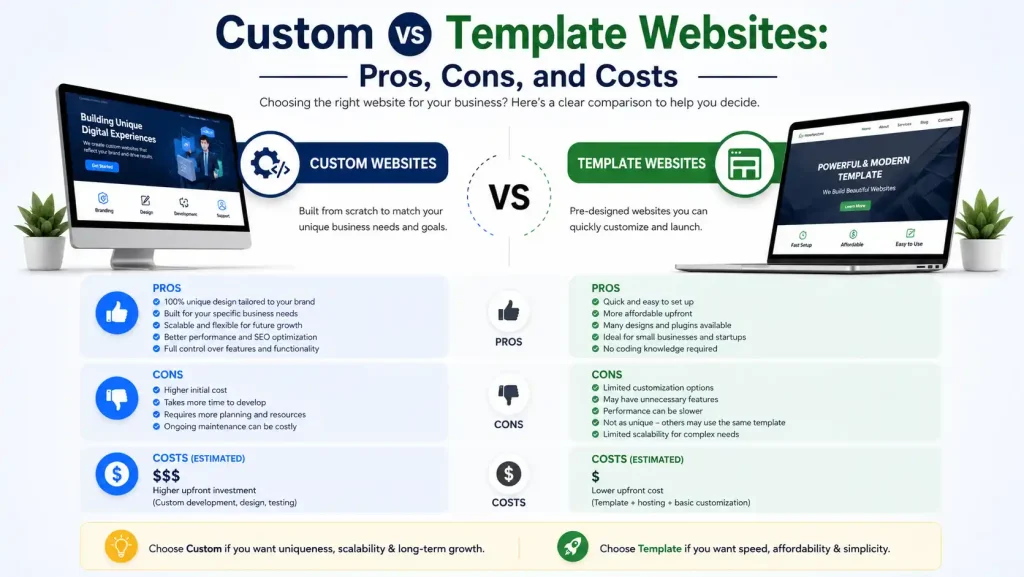
Custom vs Template Websites: Pros, Cons, and Costs - Complete Comparison Guide
Introduction
Every business owner faces this critical decision: Should I invest in a custom website or use a template?
This single choice impacts:
- Initial investment: ₹30,000 to ₹50,00,000+
- Timeline: 2 weeks to 20 weeks
- Long-term costs: ₹5,000 to ₹1,00,000+ monthly
- Business scalability: Limited to unlimited
- Competitive advantage: Minimal to maximum
- ROI potential: 50% to 1000%+
Most businesses make this decision without understanding the real tradeoffs. Many regret their choice 6-12 months later.
This comprehensive guide provides everything you need to make the right decision for YOUR specific business. We’ll break down the real costs, honest pros and cons, and help you understand which solution aligns with your goals, budget, and timeline.
Understanding the Two Approaches
What Are Template Websites?
Definition: Pre-built website designs that you customize with your content. Think of it like buying a house where the design and structure are already decided—you just paint it and decorate it.
Examples:
- WordPress themes (₹0-50,000)
- Wix, Squarespace (web builders)
- Shopify (e-commerce)
- Website builders (Grammarly, Elementor)
How It Works:
- Choose from thousands of pre-designed templates
- Customize colors, fonts, layout
- Add your content
- Publish
- Most can be done in days/weeks
What Are Custom Websites?
Definition: Websites built from scratch specifically for your business. Every design element, functionality, and feature is custom-coded. Like building a house exactly as you envision it.
Examples:
- Custom-coded websites (React, Vue, Node.js)
- Bespoke web applications
- Enterprise solutions
How It Works:
- Requirements gathering and strategy
- Custom design specific to your brand
- Custom development from scratch
- Rigorous testing
- Launch
- Timeline: weeks to months
Side-by-Side Comparison: Template vs Custom Websites
Cost Comparison
| Aspect | Template | Custom |
|---|---|---|
| Initial Cost | ₹30K-3L | ₹2L-50L+ |
| Setup Time | 2-4 weeks | 8-20 weeks |
| Monthly Hosting | ₹1K-10K | ₹3K-20K |
| Maintenance | ₹2K-5K/month | ₹5K-50K/month |
| Annual Software/License | ₹10K-50K | ₹0-20K |
| Scaling Cost | Medium | Low |
| Long-term ROI | Moderate | High |
Feature Comparison
| Feature | Template | Custom |
|---|---|---|
| Design Uniqueness | Same as many sites | 100% unique |
| Customization Limit | 60-70% | 100% |
| Performance | Good | Excellent |
| Scalability | Limited | Unlimited |
| Integrations | Plugin-based | Unlimited |
| SEO Potential | Good | Excellent |
| Security | Good | Excellent |
| Load Speed | Good | Excellent |
| Mobile Ready | Yes | Yes |
| E-commerce | Limited-Good | Unlimited |
Template Websites: The Complete Breakdown
Advantages of Template Websites
1. Significantly Lower Initial Cost
Reality:
- Small business template site: ₹30,000-1,00,000
- Medium business: ₹1,00,000-3,00,000
- Large business: ₹3,00,000-10,00,000
Compare to custom: 5-20x cheaper
Who Benefits:
- Startups with limited budgets
- Businesses wanting to test market first
- Service businesses with simple needs
- Established businesses wanting quick launch
2. Fast Deployment (Weeks vs Months)
Timeline:
- Design: 1-2 weeks
- Customization: 1-2 weeks
- Testing: 1 week
- Total: 3-4 weeks
Real Scenario: Local boutique needed website in 3 weeks. Template solution perfect. Launched on time, started generating sales immediately.
3. Easy to Update Content Yourself
Most template platforms have drag-and-drop editors:
- Update products: 5 minutes
- Add blog post: 10 minutes
- Change pricing: 2 minutes
- No technical knowledge needed
Cost Saving: Avoids ₹500-2000 cost per update from developer.
4. Built-in Best Practices
Professional designers optimized these templates:
- Mobile responsive (tested on 100+ devices)
- SEO best practices built-in
- Fast loading (usually under 2 seconds)
- Accessibility compliance
- Security standards included
5. Abundance of Plugins/Extensions
Want to add features?
Template: Install a plugin (₹0-50K)
- Payment gateway: 1 click
- Email newsletter: 1 click
- Contact form: 1 click
- Analytics: 1 click
- Backup system: 1 click
Thousands of plugins solve common problems.
6. No Technical Expertise Required
Management becomes easy:
- Update content without coding
- Install features without coding
- Manage analytics without coding
- Most issues have Google-searchable solutions
Cost Saving: Don’t need ongoing developer support.
Disadvantages of Template Websites
1. Limited Uniqueness
The Problem: Thousands of businesses use the same template.
Real Scenario: You pick “Modern Business” theme. So do 10,000 others. Your site looks like competitors.
Impact:
- Less brand differentiation
- Customers may confuse you with competitors
- Lower perceived value
- Premium positioning difficult
2. Customization Ceiling
What You Can’t Change:
- Core architecture
- Some fundamental layouts
- Some functionality limitations
- Performance bottlenecks
Example: Want custom feature? Might not be possible without developer.
3. Vendor Lock-in
The Risk: Switch platforms? Lost investment.
Why: Content is trapped in platform’s format. Moving to custom site requires rebuilding.
Cost: Rebuilding costs as much as custom site from scratch.
4. Performance Limitations
Templates aren’t optimized for YOUR specific needs.
Results:
- Slower load times (with more content)
- More plugins = more slowness
- Heavy themes bog down site
- Mobile performance suffers
Impact:
- Lower Google rankings
- Higher bounce rates
- Fewer conversions
5. Scalability Issues
As You Grow:
- Adding 1000 products: Struggles
- Handling 100K visitors/month: Problems
- Complex workflows: Not possible
- Custom integrations: Expensive/impossible
Reality: Many successful template-based businesses hit ceiling and rebuild with custom solution (costs 2-3x).
6. SEO Limitations
Templates have basic SEO built-in, but:
- Can’t optimize everything
- Performance issues hurt ranking
- Duplicate content concerns
- Limited customization of meta data
- Hard to implement advanced schema
Result: Takes longer to rank, never achieves top positions for competitive keywords.
7. Security Concerns
Templates are targets for hackers:
- Vulnerabilities in popular themes
- Plugins have security issues
- Less strict version control
- Updates sometimes break things
Cost: Security breach can cost ₹5-50 lakh+ in recovery.
8. Ongoing Dependency
You depend on:
- Platform’s continued existence
- Their pricing staying reasonable
- Their customer support
- Their technology staying modern
Risk: Platform changes terms, raises prices, or shuts down. You’re stuck.
Custom Websites: The Complete Breakdown
Advantages of Custom Websites
1. 100% Unique Design & Functionality
What You Get:
- Custom design built for YOUR brand
- No competition looks like you
- Premium positioning
- Complete control
Business Impact:
- Stronger brand identity
- Better customer perception
- Premium pricing possible
- Competitive advantage
2. Unlimited Scalability
As You Grow:
- Add 1M products: No problem
- Handle 1M visitors: Works perfectly
- Complex workflows: Possible
- Custom features: Easy to add
Business Impact: Website grows WITH your business, not against it.
3. Superior Performance
Custom websites are optimized for YOUR specific use case:
- Load time: 0.8-1.5 seconds (vs 2-3 seconds for templates)
- Mobile performance: Optimized for target users
- Server response: Lightning fast
- Database queries: Optimized
Impact:
- Better Google rankings
- Higher conversion rates
- Lower bounce rates
- Better user experience
4. Unlimited Integration Capability
Examples:
- Integrate with proprietary software
- Connect to legacy systems
- Custom CRM integration
- Blockchain integration
- AI integration
- Custom payment systems
Template: Often impossible or expensive plugins Custom: Built into the architecture
5. Maximum Security
Custom websites have:
- Security built into architecture
- No public vulnerabilities (it’s unique)
- Custom security protocols
- Regular security audits
- Complete control over updates
Cost Savings: Less risk of expensive security breaches.
6. Complete Ownership
You own:
- Source code
- Design files
- Architecture
- Data
- Everything
Freedom: Switch developers, platforms, or hosting. No dependencies.
Long-term Value: Asset value only increases over time.
7. SEO Superiority
Custom websites can implement:
- Complete SEO architecture
- Advanced schema markup
- Custom metadata control
- Performance optimization
- Specific user experience signals
- Proprietary SEO advantages
Result: Ranks faster, ranks higher, dominates competitive keywords.
8. Long-term Cost Efficiency
While initial cost is high:
- Template sites need rebuilds (costs ₹2-5L)
- Custom sites evolve and improve (costs ₹20K-1L)
- Template scaling costs high
- Custom scaling costs low
10-Year Comparison:
- Template: ₹15-30 lakh total
- Custom: ₹20-35 lakh total
- But custom is 3-5x more powerful
Disadvantages of Custom Websites
1. High Initial Investment
Reality:
- Small custom site: ₹2,00,000-5,00,000
- Medium: ₹5,00,000-20,00,000
- Large: ₹20,00,000-1,00,00,000+
Barrier: Many small businesses can’t afford this.
2. Longer Timeline
Reality:
- Small project: 8-12 weeks
- Medium: 12-20 weeks
- Large: 20+ weeks
Impact: Delayed launch = delayed revenue
3. Developer Dependency
You depend on:
- Hiring right developer/agency
- Their continued availability
- Their quality of work
- Their understanding of your needs
Risk: Poor developer = poor website. Developer leaves = difficult transitions.
4. Ongoing Maintenance Costs
Reality:
- Small site: ₹5K-20K/month
- Medium: ₹20K-100K/month
- Large: ₹100K-1,00,000+/month
Includes: Updates, security, monitoring, improvements
Note: Templates have lower maintenance (₹2K-10K/month)
5. Slower Feature Addition
Want new feature?
Template: Install plugin (₹0-50K, instant) Custom: Development required (₹50K-5L, weeks)
Trade-off: Slower but more powerful features.
6. Requires Technical Management
Even with agency support:
- Need to understand basics
- Hosting/server knowledge helpful
- Database concepts
- API understanding
Cost: May need to hire technical person (₹3-10L/year)
7. Higher Risk if Poor Quality
Poor custom website = sunk cost with no easy fix.
Template: Easy to switch Custom: Expensive to rebuild
Protection: Hire experienced developer, get references, sign clear contracts.
Real Cost Comparison: 5-Year Total Cost of Ownership
Template Website (Small Business)
Year 1:
- Platform/template: ₹50K
- Hosting: ₹30K
- Domain: ₹5K
- Professional theme: ₹20K
- Total: ₹1,05,000
Year 2-5 (Annual):
- Hosting: ₹30K
- License renewal: ₹20K
- Maintenance/updates: ₹40K
- Annual: ₹90K
5-Year Total: ₹1,05,000 + (4 × ₹90K) = ₹4,65,000
Custom Website (Small Business)
Year 1:
- Development: ₹3,00,000
- Design: ₹1,00,000
- Domain/SSL: ₹5,000
- Total: ₹4,05,000
Year 2-5 (Annual):
- Hosting: ₹50K
- Maintenance: ₹40K
- Improvements: ₹50K
- Annual: ₹1,40K
5-Year Total: ₹4,05,000 + (4 × ₹1,40K) = ₹9,65,000
Total Cost Difference: ₹5,00,000
BUT:
Template Site After 5 Years:
- Traffic: 2,000-5,000/month
- Conversions: 2-4%
- Annual revenue: ₹10-30 lakh
- Growth plateaued
Custom Site After 5 Years:
- Traffic: 10,000-50,000/month
- Conversions: 3-8%
- Annual revenue: ₹50-3 crore
- Still growing
ROI Comparison:
- Template: 215% five-year ROI
- Custom: 450%+ five-year ROI
Real Cost: Custom is only 2x investment but 5-10x return.
Phase 5: Launch (1 week)
What Happens:
- Domain and hosting setup
- SSL certificate installation
- Go-live
- Monitoring setup
- Initial support
How to Choose: Decision Framework
Choose Template Website If:
✅ Budget under ₹1,50,000
✅ Simple business needs
✅ Want to launch in weeks
✅ Don’t mind looking similar to competitors
✅ Low traffic expected (under 5K/month)
✅ Simple content updates only
✅ Want to test business model first
✅ Service business with basic needs
Best For: Startups, small local businesses, side projects, rapid MVPs
Choose Custom Website If:
✅ Budget ₹3,00,000+
✅ Complex business needs
✅ Can wait 8-16 weeks
✅ Competitive market (need differentiation)
✅ High traffic expected (10K+/month)
✅ E-commerce with complex workflows
✅ Need custom integrations
✅ Scaling business
✅ Long-term asset building
Best For: Growing businesses, e-commerce, SaaS, enterprise, competitive markets
The Smart Hybrid Approach
Many successful businesses use THIS strategy:
Year 1: Launch Template Site
- Cost: ₹1,00,000
- Time: 4 weeks
- Goal: Prove concept, generate revenue
- Reach: Get first 1,000 customers
Year 2: Add Custom Features
- Cost: ₹1,50,000-3,00,000
- Time: 8 weeks
- Build on template foundation
- Add critical custom features
Year 3: Full Custom Migration
- Cost: ₹2,00,000-5,00,000
- Time: 10-12 weeks
- Build from ground up
- Migrate content from template
Total Investment: ₹4,50,000-8,50,000 Timeline: Gradual, lower risk Result: Proven business + custom site
Common Mistakes When Choosing
❌ Mistake 1: Choosing Based Only on Price
Wrong: “I’ll build template site, upgrade later”
Right: “Can this solution support 3 years of growth?”
Impact: Rebuilding site costs as much as original investment
❌ Mistake 2: Ignoring Long-term Scalability
Wrong: “I’ll build template site, upgrade later”
Right: “Can this solution support 3 years of growth?”
Impact: Rebuilding site costs as much as original investment
❌ Mistake 3: Not Considering Time to Revenue
Wrong: “I’ll spend 6 months on custom site”
Right: “Can I afford to wait 6 months before revenue?”
Impact: Opportunity cost of delayed launch
❌ Mistake 4: Underestimating Ongoing Costs
Wrong: “Initial cost is what matters”
Right: “What’s total 5-year cost of ownership?”
Impact: Surprise monthly bills drain budget
❌ Mistake 5: Not Thinking About Exit Strategy
Wrong: “I’ll stick with this platform forever”
Right: “What if I need to switch or sell?”
Impact: Vendor lock-in prevents growth
Do's and Don'ts for Each Approach
✅ DO with Template Websites:
- Set realistic expectations – Understand limitations
- Keep content fresh – Regular updates = better SEO
- Use quality theme – Invest in good template
- Optimize images – Compress for speed
- Plan upgrade path – How will you scale?
- Keep plugins minimal – Less = faster/more stable
- Regular backups – Critical for safety
- Monitor performance – Watch load times
❌ DON'T with Template Websites:
- Don’t expect premium brand perception
- Don’t assume you’ll never need custom work
- Don’t install too many plugins
- Don’t neglect security updates
- Don’t use cheap/unknown themes
- Don’t ignore mobile optimization
- Don’t expect top rankings for competitive keywords
- Don’t set and forget – maintenance required
✅ DO with Custom Websites:
- Hire experienced developer – Quality matters
- Plan ahead – Clear requirements before development
- Get references – Check past work
- Plan maintenance budget – Required for long-term health
- Set clear timeline – Realistic expectations
- Document everything – Transition easier later
- Start with MVP – Minimum viable product, then expand
- Plan for testing – Critical before launch
❌ DON'T with Custom Websites:
- Don’t rush requirements gathering
- Don’t hire cheapest developer
- Don’t skip testing phase
- Don’t underestimate timeline
- Don’t lack communication channels
- Don’t skip documentation
- Don’t expect quick feature additions
- Don’t neglect ongoing support budget
Real-World Scenarios
Scenario 1: E-commerce Store
Business: Selling 5000 products
Template Approach:
- Shopify: ₹2,00,000 initial
- Struggles with 10,000+ products
- Payment processing: Limited
- Inventory management: Basic
- Scaling: ₹5,00,000+ to upgrade
Custom Approach:
- Custom e-commerce: ₹5,00,000 initial
- Handles unlimited products
- Advanced payment processing
- Complex inventory workflows
- Scaling: Adds ₹1,00,000 features
Winner: Custom (long-term ROI higher)
Scenario 2: Service Business
Business: Local consulting firm
Template Approach:
- WordPress: ₹80,000 initial
- Handles client needs perfectly
- Simple portfolio showcase
- Contact form + booking
- Scaling: ₹2,00,000+ if needed
Custom Approach:
- Custom site: ₹3,00,000 initial
- Overkill for simple needs
- Higher maintenance
- More complex than necessary
- Scaling: ₹50,000 to add features
Winner: Template (best use of budget)
Evaluation Checklist
Winner: Template (best use of budget)
Before Choosing Template:
Budget under ₹1,50,000?
Simple business needs?
OK with 4-week timeline?
Expected traffic under 5K/month?
OK looking similar to competitors?
Not planning to scale significantly?
Before Choosing Custom:
Budget ₹3,00,000+?
Complex business requirements?
Can wait 8-16 weeks?
Expected traffic 10K+/month?
Competitive market (need differentiation)?
Planning significant growth?
Ready to Make Your Decision?
At Onetech Solution, we’ve helped 100+ businesses choose the right approach for their specific needs.
We specialize in:
- Template site implementation (WordPress, Shopify, Wix)
- Custom website development (React, Vue, Node.js)
- Hybrid approaches (start template, upgrade to custom)
- Migration planning (template to custom)
Get Your Free Website Strategy Consultation!
📞 Call us: +91 966-988-5053 | +91 8770-70-3080
📧 Email: info@onetechsolution.in
🌐 Visit: https://onetechsolution.in
We’ll assess your specific needs, recommend the best approach, and provide realistic cost/timeline estimates.
FAQs: Custom vs Template Websites
Q1: Can I upgrade from template to custom later?
Ans: Yes, but it’s expensive. Better to choose right initially.
Q2: Which is faster to build?
Ans: Template (2-4 weeks) vs Custom (8-16 weeks)
Q3: Which ranks better on Google?
Ans: Custom ranks better, but template can rank well with optimization.
Q4: Which is more secure?
Ans: Custom (more control) but template can be secure with updates.
Q5: What if I have custom needs?
Ans: Custom website. Template has limitations you’ll hit.
Q6: How much ongoing support is needed?
Ans: Template: ₹2-10K/month. Custom: ₹5-50K/month
Q7: Can I get unique design with template?
Ans: Somewhat, but will still look familiar to others using same theme.
Q8: What's best for e-commerce?
Ans: Custom usually better for growth, Shopify template for simple stores.
Q9: Can template handle growth?
Ans: Limited. Plan migration to custom if significant growth expected.
Q10: Which has better customer support?
Ans: Template (Shopify, Wix have 24/7 support). Custom depends on agency.
Conclusion: There's No Universal Answer
The “best” choice depends on YOUR specific situation:
- Your budget
- Your timeline
- Your technical complexity
- Your growth plans
- Your competitive landscape
- Your long-term vision
Template websites make sense when you want quick, affordable launch.
Custom websites make sense when you need competitive advantage, scalability, and long-term asset.
Hybrid approach makes sense when you want best of both: quick launch with custom foundation.
Make the decision intentionally, understand the tradeoffs, and you’ll end up with a website that serves your business goals effectively.