







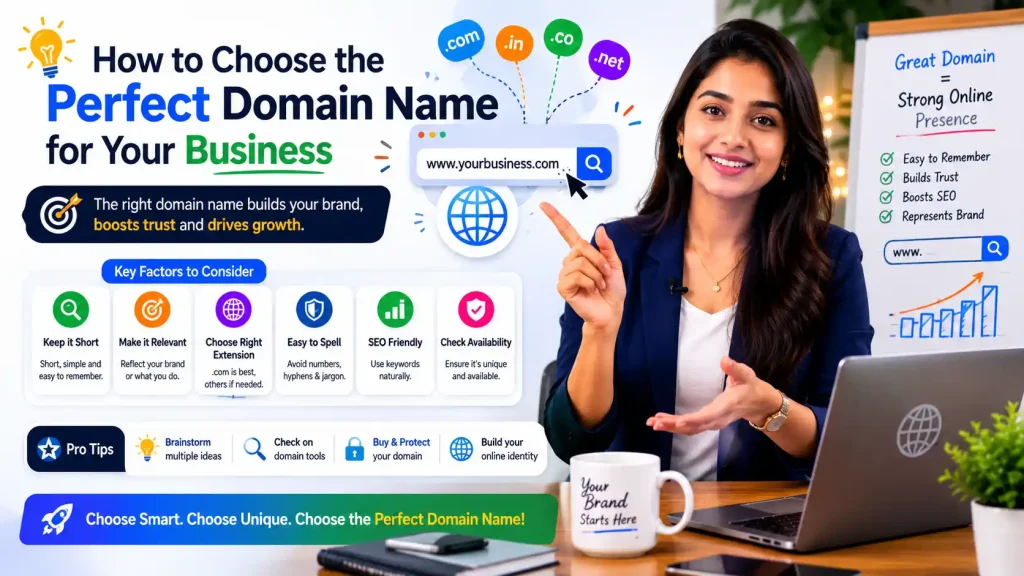
How to Choose the Perfect Domain Name for Your Business: Complete Guide
Introduction
How to choose perfect domain name for business. Best practices, 7-day process, mistakes to avoid, registrars. Step-by-step checklist included. When you start a business, one of the first decisions you make is your domain name. It seems simple: just pick a name, buy it, and move on, right?
Wrong.
Your domain name is far more important than most entrepreneurs realize. It affects:
- SEO Rankings (domain authority, keyword relevance)
- Brand Perception (professionalism, credibility, memorability)
- Email Address (professional vs. free email)
- Social Media Availability (brand consistency)
- Long-term Business Value (harder to change later)
- Customer Trust (legitimacy signals)
- Marketing Effectiveness (easier to remember and share)
- Future Growth (scalability constraints)
A poor domain name choice costs businesses ₹5-50 lakh in lost opportunity, brand confusion, and wasted marketing efforts. Yet most businesses never think through this decision strategically.
This comprehensive guide walks you through exactly how to choose the perfect domain name for your business—one that aligns with your brand, boosts SEO, and serves your business for decades.
Why Domain Name Choice Matters More Than You Think
The Business Impact:
Statistics:
- 77% of consumers judge website credibility by domain name
- .com domains have 3.8x higher trust rating than other extensions
- A memorable domain increases brand recall by 40-60%
- Domain name affects SEO rankings (direct ranking factor)
- Poor domain name can cost ₹10-50 lakh in lost business
The SEO Impact:
How Domain Affects Rankings:
- Keywords in domain boost relevance (modest boost, ~5-10%)
- Domain authority accumulates over time (major factor)
- Domain age matters (older domains rank higher, all else equal)
- Domain history affects rankings (if bought secondhand)
- Brand recognition affects click-through rates
The Brand Impact:
Professional Perception:
- Domain conveys legitimacy (yourname@business.com vs. yourname@gmail.com)
- Memorability affects word-of-mouth (shorter easier to remember)
- Brand consistency (matching social media, offline, online)
- Expandability (can grow business without changing domain)
What Makes a Perfect Domain Name?
The 7 Characteristics of Great Domains:
1. Short (2-3 Words Maximum)
Why It Matters:
- Easy to remember
- Easy to type
- Less chance of typos
- Better for verbal communication
- Looks cleaner in emails
Examples:
✅ GOOD:
– apple.com (5 letters)
– amazon.com (6 letters)
– google.com (6 letters)
– slack.com (5 letters)
❌ AVOID:
– bestdigitalmarketingagencyindelhi.com (too long)
– myincredibleonlinebusinesssolutions.com (hard to remember)
– thelongestdomainnameintheworldever.com (impractical)
Guideline: Target 5-15 characters for optimal memorability.
2. Memorable & Brandable
What This Means:
- Unique (not generic)
- Easy to spell
- Evokes brand essence
- Stands out from competitors
- Creates positive associations
Examples:
✅ GREAT BRANDING:
– Twitter (sounds like bird, short, memorable)
– Uber (short, powerful, implies superiority)
– Spotify (creative, unique, memorable)
❌ POOR BRANDING:
– Company123.com (generic, forgettable)
– ServiceProvider.com (no personality)
– WebsiteServices.com (boring, common)
3. Easy to Spell & Pronounce
Critical for:
- Verbal sharing (“Can you spell that?”)
- Email communication
- Phone conversations
- Word-of-mouth marketing
- Avoiding typos in traffic loss
Red Flags:
- Silent letters (knight, psychology)
- Unusual letter combinations (xyztech.com)
- Homonyms (site/sight, break/brake)
- Numbers replacing letters (2fast.com vs. tofast.com)
Examples:
✅ EASY:
– mailchimp.com (clear pronunciation)
– basecamp.com (obvious spelling)
– asana.com (simple, elegant)
❌ HARD:
– quuxtech.com (unclear pronunciation)
– gnomic.com (silent G, confusing)
– psych.com (people think it’s psike)
4. Keyword-Relevant (When Possible)
How It Helps:
- Small SEO boost (5-10% impact)
- Better describes business
- Easier for customers to understand
- Matches search intent
- Helps with brand clarity
Types of Keyword Domains:
Exact Match:
✅ webdesignservices.com (exact keyword match)
✅ digitalmarketingagency.com (exact keyword)
Partial Match:
✅ smithdigitalmarketing.com (keyword + brand)
✅ londonwebdesign.com (location + keyword)
Non-Keyword (Brand-Focused):
✅ google.com (pure brand, no keywords)
✅ apple.com (pure brand, no keywords)
Strategy: Don’t force keywords if it hurts branding. A great brand name (Google) beats an exact match domain (search-engine-services.com).
5. No Hyphens or Numbers
Why Avoid:
- Hard to communicate verbally (“Is it hyphen or not?”)
- Looks unprofessional
- People forget hyphens/numbers
- Splits domain authority
- More expensive (premium usually without hyphens)
Problems:
❌ web-design-services.com
– “Do I type the hyphens?” (confusion)
– “Is it web-design or webdesign?” (lost traffic)
– Looks less professional
❌ webdesign123.com
– “Is it webdesign123 or webdesign?”
– Numbers confuse people
– Looks temporary/unprofessional
Best Practice: Use simple letters only. No hyphens, no numbers.
6. Right Extension (.com vs. Others)
The Extensions & Their Uses:
.COM (Commercial)
– Best for businesses
– Highest trust (77% prefer .com)
– Most expensive
– ✅ RECOMMENDED for most businesses
.IN (India-Specific)
– Best for India-targeted business
– Lower cost
– Good for local SEO
– ✅ Good for India businesses
– ❌ May limit international perception
.CO (Alternative to .com)
– Growing in popularity
– 2-5% cheaper than .com
– Good alternative
– ⚠️ Use if .com taken
.ORG (Non-Profit)
– Originally for non-profits
– Now anyone can use
– Good for NGOs, communities
– ❌ NOT for commercial business
.NET (Network)
– Originally for network companies
– Now generic
– Older perception
– ⚠️ Use only if .com unavailable
.BIZ (Business)
– Specifically for business
– Less popular
– Cheaper
– ⚠️ Lower trust than .com
.BLOG, .SHOP, .TECH (New TLDs)
– Industry-specific
– Growing usage
– Lower cost
– ⚠️ Newer, lower trust
Recommendation for Most Businesses:
- First choice: domain.com (best)
- Second choice: domain.in (if targeting India)
- Third choice: domain.co (if .com taken)
- Last resort: other extensions (lower trust)
7. Available on Social Media
Critical for Brand Consistency:
Before buying domain, verify availability on:
- Instagram (@yourdomain)
- Twitter (@yourdomain)
- Facebook (yourdomain)
- LinkedIn (company/yourdomain)
- YouTube (c/yourdomain)
- TikTok (@yourdomain)
- Pinterest (yourdomain)
Why It Matters:
- Consistent branding across platforms
- Easier for customers to find you
- Prevents competitors using your name
- Professional appearance
- Better for marketing
Action: If domain isn’t available on main social platforms, reconsider domain choice.
Common Domain Name Mistakes (And How to Avoid Them)
❌ Mistake 1: Choosing Too Trendy Name
The Problem: “Social123.com” (trendy in 2015, dated by 2020)
Why It Hurts:
- Trends change
- Domain becomes irrelevant
- Hard to rebrand later
- Looks outdated
Solution: Choose timeless names. Think 10-20 year horizon, not current trend.
❌ Mistake 2: Ignoring Trademark Issues
The Problem: Registering domain that violates trademark.
Legal Risk:
- Cease and desist letters
- Domain confiscated
- Legal fees ₹5-50 lakh+
- Wasted investment
Solution: Check trademarks before registering:
- Google Trademark Database
- India Trademark Office
- TM availability checkers
❌ Mistake 3: Forgetting Email Address Factor
The Problem: Choosing domain that makes weird email.
Bad Examples:
❌ shirtspot.com → emails: john@shirtspot.com
(looks odd/suggestive)
❌ therapists.com → emails: therapist@therapists.com
(awkward phrasing)
❌ cuminsurance.com → emails: name@cuminsurance.com
(embarrassing)
Good Examples:
✅ amazon.com → emails: john@amazon.com (professional)
✅ microsoft.com → emails: john@microsoft.com (prestigious)
Solution: Say the email out loud. If it sounds unprofessional, reconsider.
❌ Mistake 4: Not Checking Domain History
The Problem: Buying domain with bad history.
Possible Issues:
- Previous owner’s site was spam
- Domain was blacklisted
- Google penalties applied
- Bad reputation in industry
Impact:
- SEO rankings hurt (inherited penalties)
- Email delivery problems
- Trust issues
Solution: Check domain history before buying:
- Wayback Machine (archive.org)
- Domain history tools
- Google Search Console (check for penalties)
❌ Mistake 5: Using Your Personal Name
The Problem: john@johnsmith.com
Why It Limits Growth:
- Can’t build bigger brand
- Hard to sell business
- Looks like freelancer, not company
- Limited scalability
When It’s OK:
- Consultant/personal brand
- Freelancer
- One-person service
Better for Business: Create company name that’s separate from personal name.
❌ Mistake 6: Ignoring .com Premium Prices
The Problem: Popular .com domain costs ₹2,00,000+
Options:
- Buy it (worth investment if matches business)
- Use cheaper extension (.in, .co)
- Choose different domain name
Decision Framework:
- ₹5,000-10,000/year: Worth paying
- ₹50,000-1,00,000: Evaluate carefully
- ₹2,00,000+: Only if critical to business
❌ Mistake 7: Not Locking Domain & Setting Auto-Renew
The Problem: Domain expires → someone else buys it
Real Scenario: Domain expires for 30 days → domain hijacked → business loses presence
Solution: After registering domain:
- Domain Lock (prevent unauthorized transfers)
- Auto-Renew (automatic renewal before expiry)
- Private Registration (hide personal info)
- Backup Email (get renewal reminders)
Step-by-Step Guide: How to Choose Perfect Domain Name for Business
Step 1: Define Your Brand Name (Week 1)
What to do:
- Brainstorm 10-20 potential business names
- Say each out loud (check pronunciation)
- Write each down (check spelling ease)
- Say as email address (sounds professional?)
- Check no negative associations
- Verify no trademarks
Deliverable: List of 5-10 strong candidate names.
Step 2: Check Domain Availability (Day 1-2)
What to do:
- Go to registrar (GoDaddy, Namecheap, BigRock, etc.)
- Search each candidate domain
- Check .com availability
- Check .in availability
- Check .co availability
- Document pricing for each
Tools:
- Domain registrars (GoDaddy, Namecheap)
- Bulk domain checker
- WHOIS lookup
Deliverable: Available domains with pricing.
Step 3: Check Social Media Availability (Day 1-2)
What to do:
- Check Instagram availability
- Check Twitter availability
- Check Facebook availability
- Check LinkedIn availability
- Check YouTube availability
- Check TikTok availability
Tools:
- Username checkers (namechk.com, knowem.com)
- Direct social platform searches
Decision: Verify your top 3 domain choices are available on all main platforms.
Step 4: Verify No Trademark Issues (Day 2-3)
What to do:
- Google Trademark search
- India Trademark Office search
- Check if name is generic in industry
- Search for similar trademarks
- Verify no conflicts
Tools:
- Google Trademark Database
- India Trademark Office (ipindia.gov.in)
- WIPO (international trademarks)
Decision: Confirm no trademark conflicts before proceeding.
Step 5: Check Domain History (Day 3)
What to do (if buying existing domain):
- Check Wayback Machine (archive.org)
- Look for previous website history
- Check if domain was penalized
- Research previous owner
- Check Google Search Console history
If domain is new:
- Skip this step
- Proceed with registration
Decision: Confirm clean history before buying.
Step 6: Make Final Decision & Buy (Day 4)
What to do:
- Choose #1 domain name
- Select best extension (.com preferred)
- Go to registrar
- Check final price (including all fees)
- Complete purchase
- Save confirmation email
Important:
- Enable domain lock
- Set auto-renew
- Use strong password
- Save recovery info
Deliverable: Domain purchased and registered.
Step 7: Setup After Purchase (Day 5-7)
What to do:
- Set nameservers (point to hosting)
- Create email addresses (yourname@domain.com)
- Setup DNS records (A record, MX record, CNAME)
- Enable SSL (HTTPS certificate)
- Setup DNS management (if not auto)
- Test email (send test emails)
- Verify DNS propagation (check nameservers)
Timeline: DNS propagation takes 24-48 hours to fully propagate.
Domain Name Best Practices for SEO
SEO Best Practices:
1. Include Keywords (Optional but Helpful)
✅ digitalmarketingagency.com (keyword-rich)
✅ londonwebdesign.com (location + keyword)
✅ saasproductmanagement.com (niche-specific)
SEO Benefit:
- 5-10% ranking boost (modest but real)
- Better explains business at glance
- Matches search intent
Caveat: Don’t force keywords if it hurts branding.
2. Use .com When Possible
✅ .com (best for SEO, highest trust)
⚠️ .in (good for India, lower domain authority)
⚠️ .co (newer, slightly lower trust)
3. Maintain Domain Authority
✅ Keep domain registered continuously
✅ Build backlinks to domain
✅ Create quality content on domain
✅ Maintain clean domain history
Impact: Domain authority (DA) is major ranking factor.
4. Use Exact Match Sparingly
Avoid over-reliance on exact match domains.
Google’s algorithm doesn’t favor them artificially.
Balance keyword matching with brand strength.
Do's and Don'ts for Choosing Domain
✅ DO:
1. Do Keep It Short
- 5-15 characters is ideal
- Easier to remember
- Better for verbal sharing
2. Do Make It Memorable
- Brandable, unique name
- Easy to recall
- Stands out from competitors
3. Do Check Availability Everywhere
- Domain name
- Social media handles
- Email address viability
- Trademark clearance
4. Do Think Long-Term
- Choose name for 10+ year lifespan
- Avoid trendy names
- Plan for business growth
- Consider expansion potential
5. Do Invest in .com
- Best for credibility
- Worth premium price
- Industry standard
- Better for trust
6. Do Protect Your Domain
- Enable domain lock
- Set auto-renew
- Use strong passwords
- Enable 2-factor authentication
7. Do Verify History
- Check Wayback Machine (if secondhand)
- Verify no penalties
- Research previous owner
- Confirm clean record
❌ DON'T:
1. Don't Choose Trendy Names
- Trends change
- Domain becomes dated
- Hard to rebrand later
2. Don't Ignore Trademark Issues
- Trends change
- Domain becomes dated
- Hard to rebrand later
3. Don't Use Hyphens or Numbers
- Looks unprofessional
- People forget them
- Causes confusion
- Loses traffic
4. Don't Ignore Email Address Factor
- Test email sounds professional
- Reconsider if embarrassing
- Affects business perception
5. Don't Buy Without History Check
- Previous spam/penalties hurt
- Damages SEO
- Affects email delivery
- Creates trust issues
6 . Don't Use Only Personal Name
- Limits scalability
- Hard to sell business
- Looks like freelancer
- Can’t build bigger brand
7. Don't Forget Basic Setup
- Domain lock crucial
- Auto-renew prevents loss
- Backup email for notifications
- 2FA for security
Real Examples: Good vs. Bad Domains
✅ GREAT DOMAIN CHOICES:
1. Slack.com
- Short (5 letters)
- Memorable
- Branded, not keyword-heavy
- Easy to spell/pronounce
- Available on all social platforms
- Premium .com
2. Amazon.com
- Short (6 letters)
- Memorable and unique
- Suggests size/scale
- Easy to remember
- Professional email (john@amazon.com)
3. Flipkart.com
- Unique and brandable
- Easy to pronounce
- Memorable
- Creates positive association
- Professional appearance
❌ POOR DOMAIN CHOICES:
1. Best-Digital-Marketing-Agency-In-Delhi.com
- Too long (62 characters)
- Hard to remember
- Hyphens (unprofessional)
- Difficult to say verbally
- Looks like spam
2. Services123.com
- Generic (forgettable)
- Numbers (confusing)
- No brand identity
- Looks temporary
- Not memorable
3. MyIncrediblyCoolOnlineStore.com
- Too long
- Hard to spell
- Not professional
- Dates quickly (trendy language)
- Difficult to communicate
Registrars & Where to Buy Domain Names
Popular Domain Registrars (India & Global):
India-Based:
- BigRock.com (Indian, affordable)
- Name.com.in (Indian registrar)
- NamesDrive.com (Indian)
Global (Works in India):
- GoDaddy.com (popular, expensive)
- Namecheap.com (affordable, reliable)
- Bluehost.com (web hosting + domain)
- HostGator.com (web hosting + domain)
Recommendation: BigRock or Namecheap for best combination of price and service.
Ready to Choose Your Perfect Domain?
At Onetech Solution, we help businesses choose strategic domain names that support both branding and SEO. We’ve guided 100+ businesses in selecting domains that became their digital foundation.
We Can Help With:
- Strategic domain name selection
- Trademark verification
- Domain registration assistance
- DNS setup & configuration
- Email setup on custom domain
- Domain branding strategy
Get Your Free Domain Consultation!
📞 Call us: +91 966-988-5053 | +91 8770-70-3080
📧 Email: info@onetechsolution.in
🌐 Visit: https://onetechsolution.in
We’ll help you choose a domain name that aligns with your business strategy, supports SEO, and serves your business for decades.
FAQs: Choosing Perfect Domain Name
Q1: Is .com always better than .in?
Ans: For global reach, .com is better. For India-focused business, .in works well. .com has higher trust (77%) but .in supports local SEO.
Q2: How much should I spend on domain?
Ans: Regular domains: ₹300-500/year. Premium domains: ₹5,000-1,00,000/year. Most should budget ₹500-1,000/year.
Q3: Can I change domain name later?
Ans: Yes, but it’s expensive and hurts SEO. Best to choose right initially.
Q4: Do keywords in domain help SEO?
Ans: Yes, 5-10% boost. But don’t sacrifice branding for keywords.
Q5: Should I buy multiple domain extensions?
Ans: Recommended: main domain (.com or .in) + 1-2 alternatives to prevent competitor abuse.
Q6: How do I protect my domain?
Ans: Enable domain lock, set auto-renew, use strong password, enable 2FA.
Q7: What if my desired domain is taken?
Ans: Try different extension (.in, .co), different name, or negotiate purchase.
Q8: Can domain name affect email delivery?
Ans: Yes, if domain has bad history or reputation.
Q9: Should I use name generator tools?
Ans: They help brainstorm but verify reputation, trademark, and availability.
Q10: How long before domain reflects online?
Ans: 24-48 hours for full DNS propagation. Can take up to 72 hours.
Conclusion: Your Domain is Your Foundation
Your domain name is more than just your web address. It’s your digital identity, your brand foundation, and a long-term business asset.
The difference between a great domain and a poor one can impact your business for decades.
A great domain:
- Is memorable and brandable
- Supports your SEO efforts
- Creates professional perception
- Supports business growth
- Becomes valuable asset over time
A poor domain:
- Confuses customers
- Limits growth potential
- Hurts SEO efforts
- Damages brand perception
- Becomes expensive to change later
Take time with this decision. Follow this guide. Choose strategically. And your domain will serve your business for years to come.