





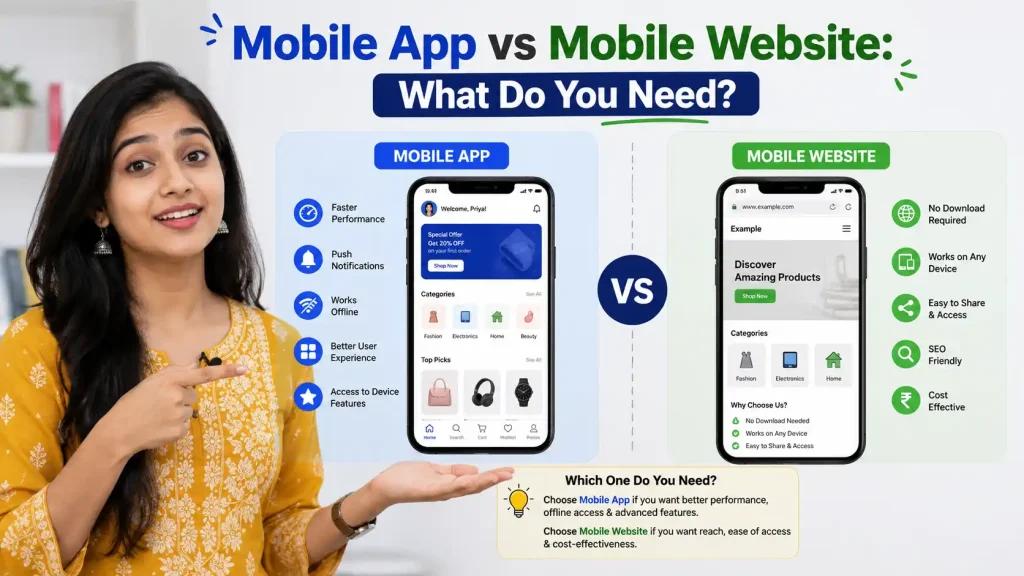
Mobile App vs Mobile Website: What Do You Need?
Introduction
Mobile App vs Website: If you’re running a business in India in 2026, you’ve likely asked yourself this question: “Should I invest in a mobile app or build a mobile website?” It’s a decision that can cost anywhere from ₹2,00,000 to ₹50,00,000 and profoundly impact your business growth.
The short answer? It depends. But the longer, more useful answer requires understanding your business goals, target audience, budget, and technical capabilities. With 750+ million mobile users in India, the pressure to go mobile is real. Yet many businesses waste thousands of rupees building the wrong solution for their needs.
In this comprehensive guide, we’ll compare mobile apps versus mobile websites, break down the real costs, and help you make an informed decision that aligns with your business objectives. Whether you’re a startup in Bangalore, an e-commerce business in Mumbai, or a service provider in Delhi, this guide will clarify which path is right for you.
What is a Mobile App? Understanding Native Applications
Mobile App vs Website: A mobile app is a software application specifically designed and built for mobile devices like smartphones and tablets. These are the applications you download from Google Play Store (Android) or Apple App Store (iOS).
Types of Mobile Apps:
1. Native Apps
- Built specifically for one operating system (iOS or Android)
- Written in languages like Swift (iOS) or Kotlin (Android)
- Optimized for device-specific features and performance
- Fastest performance and best user experience
- Highest development cost
2. Cross-Platform Apps
- Built once, run on multiple platforms (iOS + Android)
- Languages: Flutter, React Native, Xamarin
- Good performance, slightly lower cost than native
- Easier to maintain across platforms
3. Progressive Web Apps (PWA)
- Web apps that behave like native apps
- Can work offline
- Installable on home screen
- Lower cost than native apps
- Accessible through browsers and app stores
What is a Mobile Website? Understanding Web-Based Solutions
A mobile website is a responsive website optimized for mobile devices. It’s accessed through a web browser (Chrome, Safari, etc.) rather than downloaded as an app. Users simply visit your URL and access your services directly.
Types of Mobile Websites:
1. Responsive Mobile Website
- Single website that adapts to all screen sizes
- Built with HTML, CSS, JavaScript
- Works on all devices and browsers
- Modern standard approach
2. Mobile-Specific Website (m.example.com)
- Separate mobile URL from desktop
- Outdated approach, not recommended
- Creates duplicate content issues
- Difficult to maintain
3. Progressive Web App (PWA) - Hybrid
- Functions like an app but accessed via browser
- Can be installed like an app
- Works offline
- No app store submission needed
Mobile App vs Website: The Key Differences
| Feature | Mobile App | Mobile Website |
|---|---|---|
| Installation | Download from app store | Access via browser URL |
| Device Storage | Requires device storage (20-500 MB) | No storage needed |
| Device Features Access | Full access (camera, GPS, contacts) | Limited access |
| Offline Functionality | Can work offline | Requires internet |
| Performance | Fastest possible | Slightly slower |
| Development Cost | ₹3,00,000 – ₹50,00,000 | ₹50,000 – ₹5,00,000 |
| Development Time | 4-12 months | 2-6 weeks |
| Maintenance | Complex (OS updates, versions) | Simple (one codebase) |
| User Reach | Only those who download | Anyone with browser |
| Discoverability | App store + search engines | Search engines only |
| Updates | Manual updates via store | Automatic updates |
| Browser Compatibility | N/A | Requires browser support |
| Push Notifications | Native support | Limited (web notifications) |
| Monetization | App store revenue, in-app purchases | Ads, subscriptions, in-app purchases |
| Security | Device-level security | Standard web security |
Why Choose a Mobile App for Your Business?
1. Superior User Experience
Mobile apps provide a native, optimized experience that feels natural on smartphones. They’re specifically designed for touch interactions, use device-specific UI patterns (Material Design for Android, HIG for iOS), and deliver faster performance than browsers.
For businesses offering games, high-performance tools, or immersive experiences, apps are the clear winner.
2. Direct Device Access
Apps can access device features that websites cannot:
- Camera – Instant photo capture for e-commerce try-ons
- GPS Location – Accurate location-based services
- Contacts – Easy contact import
- Microphone – Voice features and calls
- Accelerometer – Motion-based interactions
- Notifications – Push notifications that work reliably
This is crucial for businesses like ride-sharing (Uber), food delivery (Swiggy), or fitness apps that need real-time location and device features.
3. Offline Functionality
Apps can sync data and function partially or fully offline. Users can:
- View previously loaded content without internet
- Queue actions (like orders) to submit when connected
- Continue using core features offline
Perfect for banking apps, music streaming, or news apps used during commutes on Indian trains where connectivity is spotty.
4. Push Notifications
Native push notifications are significantly more effective than web notifications:
- Native apps: 45-50% open rate for well-targeted notifications
- Web notifications: 3-5% open rate (often ignored or disabled)
For Indian businesses, push notifications are critical for engagement, discount announcements, and order updates.
5. App Store Visibility
Being listed in Google Play Store and Apple App Store provides:
- Discoverability – Featured sections, categories, recommendations
- Social proof – Star ratings, review counts build trust
- Credibility – Presence on official stores signals legitimacy
- Featured opportunities – Potential to be featured (massive traffic boost)
Many Indian users trust the official app stores more than random websites.
6. Monetization Opportunities
Apps offer more monetization paths:
- In-app purchases (games, premium features)
- Paid apps (upfront purchase)
- Subscriptions
- Ads
- Sponsored content
7. Better Performance
Apps run significantly faster than websites:
- App load time: 1-2 seconds
- Website load time: 2-5 seconds
- Native apps don’t rely on browser rendering engine
- Direct hardware access for computationally intensive tasks
For trading apps, gaming, or real-time communication, speed is essential.
Why Choose a Mobile Website Instead?
1. Lower Development Cost
This is the biggest advantage. Website development costs 70-90% less than app development:
- App (Native): ₹3,00,000 – ₹50,00,000
- Website: ₹50,000 – ₹5,00,000
For startups and small businesses, websites are the only feasible option.
2. Faster Time to Market
- App: 4-12 months from concept to app store launch
- Website: 2-6 weeks to launch
In a competitive market, speed matters. You can launch a website, get user feedback, and iterate quickly.
3. Universal Accessibility
Websites work on ALL devices:
- Any smartphone (iPhone, Samsung, Xiaomi, etc.)
- Any operating system (iOS, Android, even old feature phones)
- Any browser
- No download required
With India’s diverse device ecosystem, websites reach more people instantly.
4. No App Store Dependencies
Apps are subject to:
- Review approval – Can take days to weeks
- Store policies – Risk of removal for policy violations
- OS version requirements – Won’t work on older devices
- Storage limitations – Many Indian users have limited storage
Websites bypass all these issues. You control everything.
5. Easier Maintenance
Websites have one version:
- Single codebase to maintain
- No version fragmentation
- Updates deploy instantly
- No user action required for updates
Apps require:
- Separate codebases for iOS and Android (usually)
- Managing multiple versions in wild
- Users must manually update (many don’t)
- OS-specific bugs to fix
6. Better for Discoverability
While less discoverable than app stores, websites win on:
- SEO – Can rank in Google Search (apps can’t)
- Social sharing – Easy to share links
- Direct traffic – Users can bookmark and return
- Search visibility – Show up for relevant queries
If you rely on organic traffic and customer acquisition, websites are superior.
7. Reach Users with Limited Storage
India’s market includes millions of budget Android phones with:
- Limited storage (8-16 GB total, often full)
- Limited RAM (1-2 GB)
- Older OS versions
Websites work on all these devices. Apps? Only if users delete other apps to make space.
8. Lower Barrier to Entry
No app store account needed:
- Create Google Play Developer account (₹100 one-time)
- Create Apple Developer account (₹8,500/year)
- Website? Just domain + hosting (₹2,000-5,000/year)
9. Easier Updates and A/B Testing
Change your website instantly:
- No approval process
- No version fragmentation
- Real-time updates
- Easy A/B testing different designs
Apps require app store approval for every update.
10. Better Analytics Control
Complete data ownership:
- Install any analytics tool
- No app store limitations on tracking
- Direct access to user data
- Better conversion tracking
Cost Breakdown: App vs Website Reality
Website Development Cost in India
| Component | Cost Range |
|---|---|
| Domain + SSL | ₹500 – ₹3,000/year |
| Hosting | ₹2,000 – ₹10,000/month |
| Design (Custom) | ₹30,000 – ₹2,00,000 |
| Development (Basic) | ₹50,000 – ₹3,00,000 |
| Total First Year | ₹50,000 – ₹5,00,000 |
| Monthly Maintenance | ₹5,000 – ₹20,000 |
Native Mobile App Development Cost in India
| Component | Cost Range |
|---|---|
| UI/UX Design | ₹1,00,000 – ₹5,00,000 |
| Android Development | ₹2,00,000 – ₹15,00,000 |
| iOS Development | ₹2,00,000 – ₹15,00,000 |
| Backend Services | ₹1,00,000 – ₹10,00,000 |
| Testing & QA | ₹50,000 – ₹2,00,000 |
| App Store Submission | ₹10,000 – ₹50,000 |
| Total First Year | ₹6,00,000 – ₹50,00,000 |
| Annual Maintenance | ₹2,00,000 – ₹10,00,000 |
Ongoing Costs Comparison
| Cost Item | Website | App |
|---|---|---|
| Hosting | ₹2,000-10,000/month | ₹1,000-5,000/month* |
| Maintenance | ₹5,000-20,000/month | ₹15,000-50,000/month |
| Updates | ₹10,000-30,000/month | ₹30,000-1,00,000/month |
| OS Updates | None | ₹50,000-5,00,000/year |
| New Features | ₹50,000-2,00,000 | ₹2,00,000-10,00,000 |
*Backend only; server load varies with users
Decision Matrix: Which Should You Choose?
Choose a Mobile App If:
✅ You need offline functionality (banking, note-taking, music)
✅ Heavy use of device features (camera, GPS, contacts)
✅ High-frequency user engagement (games, social apps)
✅ Need for push notifications is critical to business model
✅ Monetization through in-app purchases or paid apps
✅ Building a brand that relies on app store presence
✅ Users expect native performance and experience
✅ You have ₹6,00,000+ budget and 6+ months timeline
✅ Target audience is willing to download apps
✅ You need offline-first or reduced data usage
Examples: Gaming apps, fitness trackers, banking apps, dating apps, productivity tools
Choose a Mobile Website If:
✅ Limited budget (under ₹3,00,000)
✅ Need to launch quickly (under 2 months)
✅ Require broad device compatibility
✅ Need search engine discoverability (SEO matters)
✅ Content-heavy (blogs, news, articles)
✅ Transactions are infrequent
✅ Users have limited storage/older devices
✅ Prefer easy updates and iterations
✅ Don’t need offline functionality
✅ Serve diverse user base (different devices/OS)
Examples: E-commerce sites, service marketplaces, news portals, SaaS platforms, local businesses
Consider Progressive Web App (PWA) If:
✅ Want app-like experience without app store approval
✅ Need offline functionality but limited budget
✅ Target budget-conscious users
✅ Want best of both worlds (app + web)
✅ Can’t manage two separate codebases
✅ Need fast development and easy updates
Cost: ₹2,00,000 – ₹8,00,000 (between website and app)
Development Time: 3-8 weeks
Real-World Case Studies: Indian Businesses
Case Study 1: E-commerce Marketplace
Business: Online fashion retailer in Mumbai (started 2023)
Decision: Mobile website first, then Progressive Web App
Why: Limited budget (₹2,00,000), need quick launch, SEO important
Results:
- Website launched in 4 weeks
- ₹1,50,000 spent on development
- ₹5,000/month hosting costs
- 45,000 users in first 6 months (organic + paid)
- 2.3% mobile conversion rate
- 18 months later: Built PWA for ₹4,00,000
- PWA installations: 8,000+ (adds push notifications)
- Increased repeat purchases by 35%
Lesson: Website worked perfectly for MVP. PWA added when budget and user base justified it.
Case Study 2: Ride-Sharing Service
Business: Local ride-sharing app in Bangalore (started 2022)
Decision: Native mobile app (iOS + Android)
Why: Needs GPS, real-time location, push notifications, offline queue
Results:
- Development cost: ₹18,00,000 (4 months)
- Monthly maintenance: ₹40,000
- App store featured: Months 3-5 (massive growth)
- First year: 1,20,000 active users
- Monthly active usage: 85% retention
- Revenue: ₹50,00,000 in year 1
Lesson: For location-based, real-time services, the app investment paid off through superior UX and feature access.
Case Study 3: Food Delivery Startup
Business: Local food delivery in Delhi NCR (started 2024)
Decision: Mobile website + PWA from day 1
Why: Limited budget (₹1,50,000), rapid iteration needed, PWA for offline orders
Results:
- Website launch: Week 2
- PWA launch: Week 6
- Total development: ₹1,50,000
- First year users: 35,000
- Monthly growth: 15%
- Push notification open rate: 12-15% (PWA)
- Decided against native app (no clear ROI advantage)
Lesson: PWA provided app-like experience at fraction of app cost. Business thrived without native app.
Technical Comparison: What You Need to Know
Mobile Website Development Stack
Frontend:
- HTML5, CSS3, JavaScript
- Responsive design frameworks (Bootstrap, Tailwind)
- Modern JS libraries (React, Vue, Angular)
Backend:
- Node.js, Python, PHP, Java
- Database (MySQL, MongoDB, PostgreSQL)
- Cloud hosting (AWS, Google Cloud, DigitalOcean)
Deployment:
- Simple – Upload files to hosting
- Automatic updates
- No version management
Browser Support:
- Must support Chrome, Safari, Firefox, Edge
- Must handle older browser versions
- Progressive enhancement important
Mobile App Development Stack
iOS App:
- Languages: Swift or Objective-C
- Framework: UIKit or SwiftUI
- Development: Xcode IDE
- Testing: Simulator + physical devices
- Deployment: Apple App Store
Android App:
- Languages: Kotlin or Java
- Framework: Android Studio
- Development: Android Studio
- Testing: Emulator + physical devices
- Deployment: Google Play Store
Cross-Platform:
- Flutter (Dart language)
- React Native (JavaScript)
- Xamarin (C#)
- Single codebase, two platforms
- Slightly less native feel
Backend:
- Same as website (APIs, databases)
- Typically more complex
- Need push notification service (Firebase, etc.)
SEO Considerations: Apps vs Websites
Website SEO Advantages
✅ Searchable: Rank in Google Search results
✅ Indexable: Google crawls and indexes content
✅ Linkable: Other sites can link to your content
✅ Shareable: Easy to share specific pages
✅ Discovery: Users find you through search queries
✅ Organic traffic: Free, sustainable traffic from search
✅ Backlinks: Can build backlinks to boost authority
App SEO Limitations
❌ Not searchable: Don’t appear in Google Search
❌ Limited discovery: Only app store search
❌ No indexing: Google can’t crawl app content
❌ No linking: Hard to link to specific app content
❌ Dependent on store: Rely on Play Store/App Store algorithms
❌ Limited organic reach: Primarily through paid ads
Solution: App Indexing (Google can index some app content, but still limited)
The Hybrid Approach: Website + App
Many successful Indian businesses use both:
Phase 1: Launch Website
- Cost: ₹2,00,000
- Time: 6-8 weeks
- Reach: Immediate
- SEO benefits: Yes
- User feedback: Collect through website
Phase 2: Add Progressive Web App
- Cost: ₹3,00,000-5,00,000
- Time: 4-6 weeks (build on website foundation)
- Benefits: App-like experience, push notifications
- No app store approval
- Better than native for budget
Phase 3: Build Native App (Optional)
- Cost: ₹8,00,000+
- Time: 4-6 months
- Only after you have:
- Proven product-market fit
- Sufficient user base
- Clear app-specific features you need
- Budget allocated
This phased approach is recommended for most Indian startups and small businesses.
Indian Market-Specific Considerations
Device Diversity
India has more device diversity than any other market:
- Budget phones (₹5,000-15,000)
- Mid-range (₹15,000-40,000)
- Premium (₹40,000+)
- All running different OS versions
Advantage: Website – Works on all devices
Network Infrastructure
- 3G still common in many areas
- 4G speeds vary widely
- Data connectivity unpredictable
Advantage: Progressive Web App – Works offline and efficiently
App Store Challenges
- Limited internet for downloading large apps
- Frequent OS updates required to maintain compatibility
- Limited storage space on most devices
Advantage: Website – No storage required, always up-to-date
User Behavior
- High trust in app stores (Google Play, Apple App Store)
- Social app dominance (WhatsApp, Instagram, etc.)
- Increasing PWA adoption
Advantage: Both – Apps for high engagement, websites for discoverability
Payment Methods
- UPI dominant (works on all browsers)
- Phone pay, Google Pay, Paytm (works on all browsers and apps)
- Credit/debit cards still important
Advantage: Both – Payment integration possible in both
Making Your Final Decision: Step-by-Step
Step 1: Define Your Core Business Needs
Ask yourself:
- What’s the primary value you provide to users?
- How often do users interact with your service?
- Do users need offline functionality?
- Do you need access to device features (camera, GPS)?
- What’s the user acquisition strategy?
Step 2: Understand Your Target Audience
- Device types they use (iPhone, Android, budget phones)
- Internet connectivity (WiFi, 4G, 3G, intermittent)
- App download willingness (premium segment downloads more)
- Usage patterns (gaming = app users, browsing = website users)
- Geographic location (tier-1 vs tier-2/3 cities)
Step 3: Calculate Your Budget & Timeline
- How much can you realistically invest? (₹50,000 – ₹50,00,000)
- How quickly do you need to launch? (days vs months)
- What’s your ongoing maintenance budget? (₹5,000-50,000/month)
- Can you sustain the cost for 12+ months?
Step 4: Identify Must-Have Features
Create two lists:
Critical Features:
- What’s absolutely necessary for your MVP?
- These determine if app/website can deliver
Nice-to-Have Features:
- What would enhance experience?
- Prioritize based on audience needs
Step 5: Make the Decision
Use this decision tree:
START: Do you have ₹6,00,000+ budget AND 6+ months?
├─ NO → Build Website or PWA
│ ├─ Quick launch needed? → Mobile Website
│ └─ App-like features needed? → Progressive Web App
│
└─ YES → Do you need device features AND offline usage?
├─ NO → Mobile Website is fine
└─ YES → Do you need app store presence/high engagement?
├─ NO → Progressive Web App
└─ YES → Native Mobile App
Do's and Don'ts When Building Your Solution
✅ DO:
- Start with the MVP – Don’t build everything. Launch with core features.
- Choose based on business logic – Not hype or trends
- Plan for mobile users – 90%+ traffic will be mobile
- Test with real users – Get feedback before major investment
- Think about maintenance costs – Apps are expensive to maintain
- Consider progressive enhancement – Website first, then PWA, then app
- Plan for analytics – Track what works and what doesn’t
- Build for Indian network conditions – Assume 3G speeds
- Support UPI and mobile payments – Critical for Indian market
- Invest in SEO if building website – Free, sustainable traffic
❌ DON’T:
- Don’t build both native apps (iOS + Android) day 1 – Massive cost, better to validate first
- Don’t assume app store visibility – 99% of apps never get featured
- Don’t ignore websites – Apps only reach 5-10% of potential audience
- Don’t build for only one device type – India has diverse ecosystem
- Don’t expect offline to work well without testing – Sync is complex
- Don’t underestimate push notification fatigue – Users disable them quickly
- Don’t skip beta testing – Real devices reveal issues
- Don’t commit to one platform long-term without testing – Needs may change
- Don’t ignore user acquisition costs – Apps have high CAC
- Don’t build features you think users want – Build features they actually need
Common Mistakes Indian Businesses Make
Mistake 1: Building native app when website would suffice
- Cost: ₹15,00,000
- Result: Low download rate, high maintenance
- Better: Website achieved same goals at ₹2,00,000
Mistake 2: Launching website without mobile optimization
- Affects: 90% of users
- Result: High bounce rate, low conversions
- Better: Responsive design from day 1
Mistake 3: Choosing app for wrong reasons
- Wrong reason: “Our competitor has an app”
- Right reason: “We need GPS functionality”
Mistake 4: Not investing in app marketing
- App cost: ₹10,00,000
- Download rate: 2-5% of target
- Marketing needed: ₹5,00,000+ for visibility
- Result: High CAC, app becomes expensive
Mistake 5: Building app but ignoring website SEO
- Missed opportunity: Free organic traffic
- Better: Website for discoverability, app for engagement
Implementation Timeline & Roadmap
Year 1: Website Phase
Months 1-2: Design & Development
- Create responsive mobile website
- Optimize for search engines
- Set up analytics
- Cost: ₹2,00,000
Months 3-6: Launch & Marketing
- Go live, drive initial traffic
- Collect user feedback
- Optimize conversion funnel
- Cost: ₹1,00,000 (marketing)
Months 7-12: Growth & Optimization
- Increase traffic (SEO, ads)
- Improve conversion rates
- Build user base
- Cost: ₹2,00,000 (marketing)
Total Year 1 Cost: ₹5,00,000 (development + marketing)
Year 2: Expansion Decision Point
Evaluate:
- Website performance and traffic
- Conversion rates and revenue
- User feedback on features
- Budget availability
If revenue growing AND budget available: → Build Progressive Web App (₹3,00,000-5,00,000)
If high user demand for app-specific features: → Build native app (₹8,00,000-20,00,000)
If website performing well: → Continue optimizing website, skip app
Year 3: Scale Based on Success
- Have data to guide decisions
- Know which features users love
- Can afford larger investment
- Lower risk of wasting money
Conclusion: The Right Choice for Your Business
The answer to “mobile app vs mobile website” isn’t one-size-fits-all. It depends on your specific business, audience, budget, and goals.
For most Indian businesses, here’s what I recommend:
If you’re a startup or small business: → Start with a responsive mobile website (₹2,00,000)
→ Then add Progressive Web App when you have users (₹4,00,000)
→ Only build native app if truly needed (₹10,00,000+)
If you’re enterprise or established: → Build both – website for reach, app for engagement
→ Invest in world-class development for native apps
→ Don’t neglect website even with great app
The golden rule: The best solution is the one that solves your users’ problems within your budget constraints.
Don’t let buzzwords, competitors, or trends dictate your choice. Make a data-driven decision based on your specific situation, and you’ll succeed.
Ready to Make Your Decision? We Can Help
At Onetech Solution, we’ve helped 100+ Indian businesses choose the right solution for their needs. We’ve built:
- 80+ mobile websites (all profitable)
- 25+ Progressive Web Apps (average 35% increase in engagement)
- 15+ native mobile apps (carefully selected for right use cases)
Whether you choose website, app, or both, we’ll guide you through the decision and deliver excellence.
Get a Free Technology Consultation Today!
📞 Call us: +91 966-988-5053 | +91 8770-70-3080
📧 Email: info@onetechsolution.in
🌐 Visit: https://onetechsolution.in
Located in Indore: EE42, Super City, Near Gyanshila Square, Dhhabli, Indore (M.P.)
We’ll assess your specific needs, explain pros and cons, and help you make the best technology investment for your business.
FAQs: Mobile App vs Website
Q1: Can I build an app later if I start with a website?
Ans: Absolutely. Many successful businesses start with websites, then add PWAs or native apps. This is the recommended phased approach.
Q2: How many users do I need before building an app?
Ans: Minimum 5,000-10,000 active users. Below this, app development costs aren’t justified unless features require it.
Q3: Is Progressive Web App better than native app?
Ans: Not always better, but more cost-effective. PWAs provide 70% of app benefits at 20% of the cost. Native apps are better for high-performance needs.
Q4: Can websites rank in search like apps can't?
Ans: Yes. Websites can rank in Google Search for thousands of keywords. Apps only appear in app store search (limited keywords).
Q5: How much does a PWA cost compared to native app?
Ans: PWA costs 40-60% of native app costs (₹3,00,000-8,00,000 vs ₹8,00,000-50,00,000).
Q6: Do I need both iOS and Android apps?
Ans: For maximum reach yes. But 80% of Indian users are Android, so you could launch Android-only initially. iOS comes later if justified by user demand.
Q7: Can website handle the same features as apps?
Ans: Almost everything except offline features and some device integrations. Websites can access camera, GPS, and notifications through modern browsers.
Q8: How long does app approval take?
Ans: Google Play: 2-4 hours (usually). Apple App Store: 1-3 days. Each update goes through approval again.
Q9: What's the app user acquisition cost in India?
Ans: ₹20-100 per user depending on app category. This is much higher than website (₹5-30 per user).
Q10: Can I monetize a website like an app?
Ans: Yes. Through ads, subscriptions, in-app purchases, and e-commerce. Websites have multiple monetization options.